Vasanth Kumar
Creative Technologist & AI programmer
Technical Art and Design
I have developed lots of tools and shaders based on project and process requirements. However, I have kept a few tools and shaders in this section.
Reskin work flow - Tool

This reskin workflow was designed to automate the process of transforming game content into new themes, reducing production time by approximately 50%.The workflow is straightforward:Export prefab data from Unity to Photoshop.Automatically generate a layered PSD using the prefab data.Create or update the artwork in Photoshop.Export the updated assets back to Unity, where the prefab is automatically updated.By eliminating repetitive manual work and keeping artists within Photoshop for most of the production process, the workflow significantly improves efficiency. Both artists and technical artists found it intuitive, easy to adopt, and highly effective for accelerating reskin production.
Ai In Photoshop - Prototype
Built a prototype integrating AI into Adobe Photoshop using the Scenario API and OpenAI API to automate layer renaming, generate intelligent metadata, and trigger AI-powered art creation workflows, improving creative production efficiency.


Visual prompting app - prototype
Designed and developed a Miro-inspired visual prompting application to bridge the communication gap between artists and generative AI models. Instead of relying solely on text prompts, the tool enables artists to build structured visual prompt boards by combining references for style, composition, color palette, lighting, camera angle, mood, materials, and artistic direction.The application acts as an AI creative assistant, organizing visual intent into a reusable prompt canvas that can be translated into optimized prompts for image generation models. By making prompting more visual and collaborative, it reduces prompt iteration, improves consistency across generated assets, and allows artists to communicate creative intent more naturally.Key features:Interactive drag-and-drop visual prompt board inspired by Miro.Organize references for style, lighting, colors, composition, textures, poses, and mood.AI-assisted prompt generation from visual references.Reusable prompt templates for consistent creative output.Designed to integrate with generative AI workflows such as ComfyUI, Flux, Stable Diffusion, and other image generation pipelines.Enables faster concept exploration and more intuitive AI-assisted creative production.


Learn english app - Prototype
Designed and developed an AI-powered English learning application to help users improve their spoken and written English through natural, everyday conversations. The app leverages conversational AI to provide personalized practice, instant feedback, and contextual language assistance. Key features: AI Tutor: Engages users in conversation, identifies grammar and pronunciation mistakes, and provides real-time corrections with explanations. Random Chat: Initiates conversations on diverse topics, enabling users to practice spontaneous, real-world communication with an AI partner. Ask Meaning: Explains the meaning of words and phrases using simple definitions, examples, and contextual usage to improve vocabulary. Rephraser: Rewrites user sentences with improved grammar, clarity, and natural fluency while preserving the original intent. The application creates a safe, interactive environment for daily English practice, helping users build confidence in speaking and writing through continuous AI-assisted learning.

Fog of War Shader – Captain Laserhawk (Multiplayer)
Designed and implemented a custom world-space depth-based Fog of War shader for the multiplayer game Captain Laserhawk, delivering a dynamic and immersive gameplay experience. Collaborated closely with the Art Director to fine-tune the shader's visual style, ensuring it aligned with the game's artistic vision while maintaining real-time performance. The feature received highly positive player feedback for its visual quality and became a key part of the game's overall presentation, demonstrating the impact of close collaboration between art and technology.


Asset integration tool
Designed and developed an automated asset integration tool to streamline the import and setup of seven different asset types into the game production pipeline. Previously, integrating each asset required 2–5 days of manual work, depending on its complexity. The tool automated the entire integration workflow—including asset validation, configuration, hierarchy setup, and project integration—reducing the process from days to just a few minutes. This significantly improved production efficiency, minimized manual errors, and enabled teams to deliver content faster at scale.

Exploration of the Servival Game
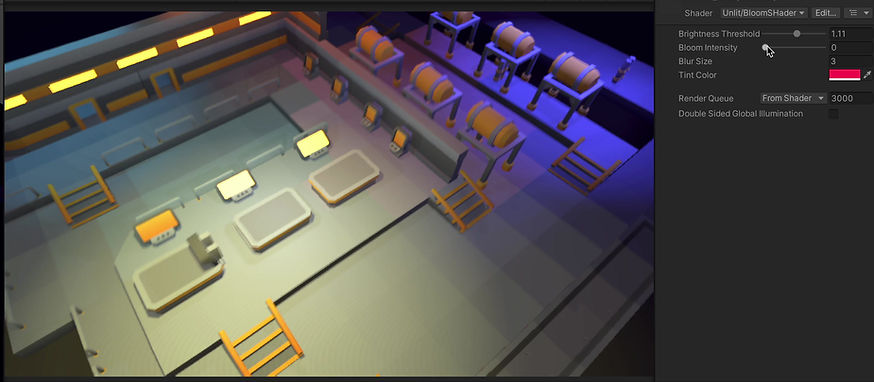
This project was developed as part of my exploration into creating a survival shooter game.
I implemented a BLOOM shader to enhance the visual aesthetics and performed light baking along with the use of light probes to improve overall visual quality.

I have explored splatter effects on the ground.
This was a small section of the game’s background environment.
In this project, my responsibilities included asset integration, lighting setup and light baking, visual exploration, particle effects and shader development.

Fun with Shader Graph
Acid Pool
Circutry
Signage
Signage & Circutry


Bee Breaker


This project is my own creation, crafted entirely from the ground up. I've been involved in various aspects of its development, including game design, user experience design, art generation, technical art, as well as programming and the design of the game's architecture.
Ui Orientation Tool

Problem: Support the entire app to vertical and horizontal orientation.
Solution: I have created a tool which would help to store orientation configuration on individual game object levels. Based on the device aspect ratio, It would load the saved configuration automatically in runtime during the orientation change.
Auto Prefab Creator

Learning Map - A feature Implemented using reactjs and run on Unity3d web view.

This is a Learning map feature created using ReactJs. This is an independent feature which users can access outside the app. and also loaded on the web view in the Unity3d app. I have created a very responsive UI which would work on any device aspect ratio. This was one of the highest engaged features of the app.


Some initial exploration in Unity 3D frame work and reactjs.


Sky Shader

Fun shader exploaration:
Blur and Overlay Shader
Fun shader exploaration:


League reprice feature for WOZMM


League reprice feature implemented for Wizard of Oz Magic match game at Zynga.
I led the tech art team half of the time during the implementation of this feature. In a result, DAU increased by 20% and ARPU increased by 12%.
Ui asset integration for features

Samples of Ui integration for features of the Wonka slot game. I have integrated all UI elements and optimized art. And also added animation states and particle effects.
Sprite atlas

Problem: Create a texture atlas for non-unity games.
Solution: I have created a texture atlas using the Unity engine. It will save the atlas into a PNG image with JSON and plist file with cropping information.
Ordinary Heroes
Freelance project.
Role: Gameplay programming and technical art.
Description: I worked in gameplay programming and asset integration for this project.

Card Game Prototype

A 2D scene integration sample

A 2d scene created in Unity3D.
Radial Gradient Progress bar shader

Problem: Required gradient in the radial progress bar for a feature in Unity3d.
Solution: I have created a shader using CG programming language in Unity and also I created a few mono behavior scripts to achieve the requirement.
God- rays effect Using Unity3D Shader
God-rays effect created in Unity3d Shader.


Tile Outline shader Using Unity3D

Outline created for tiles in Unity3d Shader.

Snack Game Using Unity3D Shader
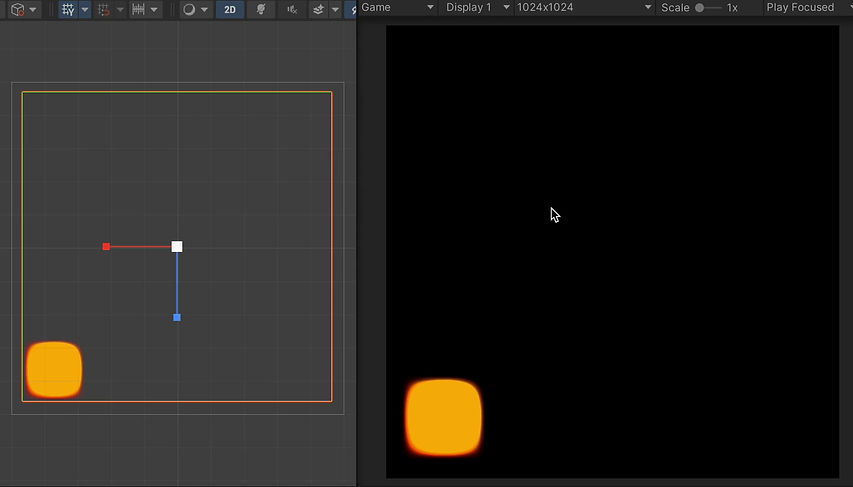
I created a moving rectangle using a Unity shader. It's quite similar to the logic of the Snake game, but implemented with a shader! I took input, passed it to the shader code, and controlled the movement based on that input.
Reskin Tool
The collection feature reskin involves the tasks of locating the correct file, copying it to the appropriate directory, and renaming numerous JSON and manifest files. This entire procedure typically takes two days to finish. The Wonka slot team has, to date, carried out the collection feature reskin 17-19 times, indicating that this is an ongoing endeavor. To streamline this process, I've developed a reskin tool.

Reskin Template for season pass

At Zynga, while working on the Wizard of Oz Magic Match game, we released the Season Pass feature eight times a year with different themes, such as Valentine's Day and Mother's Day. However, the asset bundle size was large, with 4 atlas files consuming 8 MB of memory, and the reskinning process took 4-5 days, including building and testing.I optimized the atlas size to 4 MB and created a template to streamline the reskinning process, reducing the time from 4-5 days to just half a day. This resulted in a significant improvement in efficiency and overall process optimization.
UE5 : Prototyping


I have explored Unreal Engine 5 Blueprints extensively during the prototyping phase of a game. This exploration included working with the Construction Graph in Unreal, where I gained a deeper understanding of how to create and modify game elements dynamically. Additionally, I have experimented with implementing various game functionalities, providing valuable insights into the engine's capabilities and how different components interact.

Image compressor Tool
Image compressor tool created to compress PNG images in batch. I have integrated tiny png API here. It would optimize the image to a very minimum. And it helps to reduce the disk space and decrease the download time.